


Listen to the podcast version: What is an XML Sitemap? SEO Guide for Digital Marketers
Need to get your page indexed on search engines? Don't worry, this article will show you how it's done!
First, we'll introduce to you XML Sitemaps. Then, we'll shed light on why it's a crucial part of any top-notch SEO strategy for Singapore businesses. Finally, you will learn how to implement an XML sitemap on your website. Let's get into it!
Key Takeaways
- An XML sitemap is a file that helps search engines understand and crawl a website more effectively.
- XML sitemaps improve SEO by enhancing visibility and ranking potential, leading to more organic traffic.
- There are different types of sitemaps, including XML, HTML, Image, Google News, and Video Sitemaps.
- Benefits of using XML sitemaps for SEO include improved crawlability and indexation, additional information for search engines, and easier discovery of new pages.
- To create an XML sitemap, you can use a generator tool or manually create the XML file yourself.
- Submitting your XML sitemap to search engines like Google Search Console is important for better visibility in search results.
What is an XML Sitemap for SEO?
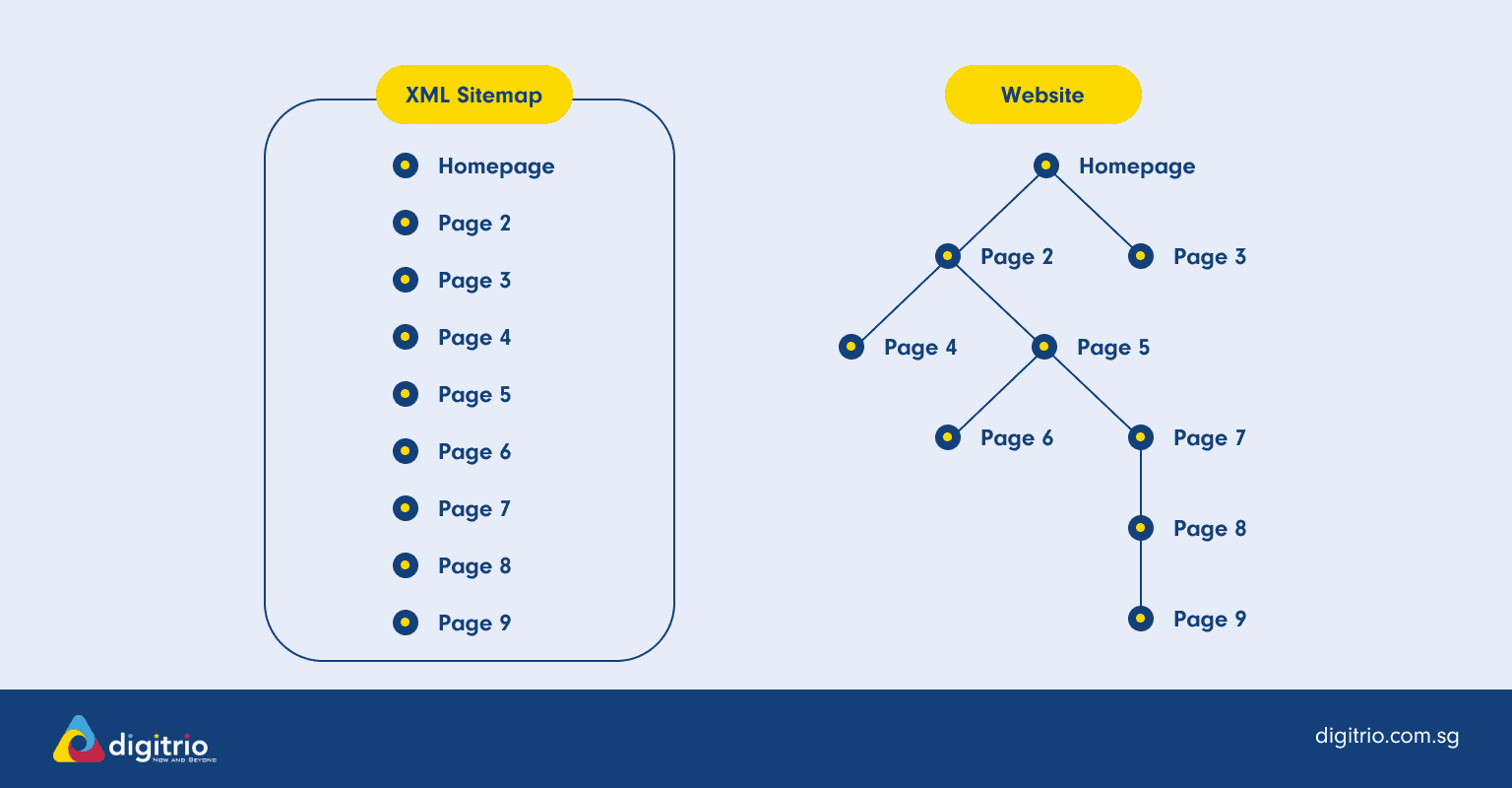
The XML Sitemap is a file that lists all the important pages on a website, helping search engines understand and crawl the site more effectively.
An XML sitemap file serves as a roadmap for search engines, listing a website's URLs and facilitating easier navigation to content. It offers information to search engine crawlers in an organized format visible to these digital readers, although not typically to site visitors. It lists URLs for a website along with metadata about each URL (when it was last updated, how often it changes, and relative importance compared to other URLs).
XML Sitemap Format and Structure
An XML sitemap is written in Extensible Markup Language (XML) and follows a specific format and structure. Understanding this structure is crucial for creating an effective sitemap. The main tags used in an XML sitemap include:
- <urlset>: The root element of the sitemap, which contains a collection of URLs.
- <url>: The parent tag for each URL entry, which contains information about the URL.
- <loc>: The tag that contains the absolute URL of the page.
- <lastmod>: The tag that contains the date the page was last modified.
- <changefreq>: The tag that indicates how frequently the page is updated.
- <priority>: The tag that indicates the importance of the page within the site.
Each of these tags plays a vital role in helping search engines understand the content and structure of your website. For example, the <loc> tag provides the exact URL, while the <lastmod> tag helps search engines know when the content was last updated, ensuring they always have the most current information.
What are the Types of Sitemaps?

You should know that there are two main types of sitemaps:
- XML Sitemaps: An XML Sitemap is in a format that machines can understand and isn't usually visible to website visitors.
- HTML Sitemaps: An HTML sitemap is not for machines, but rather for visitors who may be struggling to find specific content or simply want an overview of the site's layout.
Under XML sitemaps, it is further divided into 4 different types:
Types of XML Sitemaps
Types of Sitemap | Explanation |
|---|---|
Standard XML Sitemaps | A standard XML sitemap is the most common type, listing all the individual pages of a website. It's a straightforward list of URLs, each accompanied by additional information like the last modification date, the frequency of changes, and the priority of the page. |
Image Sitemap | An image sitemap is a tool created specifically to help Google find and understand images on a website. It's separate from the usual sitemap because Google finds it more challenging to identify pictures compared to text. |
Google News Sitemap | News Sitemaps differ from regular XML sitemaps. While the latter caters to all the content on your website, a Google News Sitemap focuses solely on news articles. This unique type of sitemap helps Google discover fresh and relevant news content from your site quickly. |
Video Sitemap | A video sitemap informs search engines about the details of the video content on your website. This information can include the video title, description, running time and even its URL location. |
Why are XML Sitemaps Important?
(3 Key SEO Benefits)
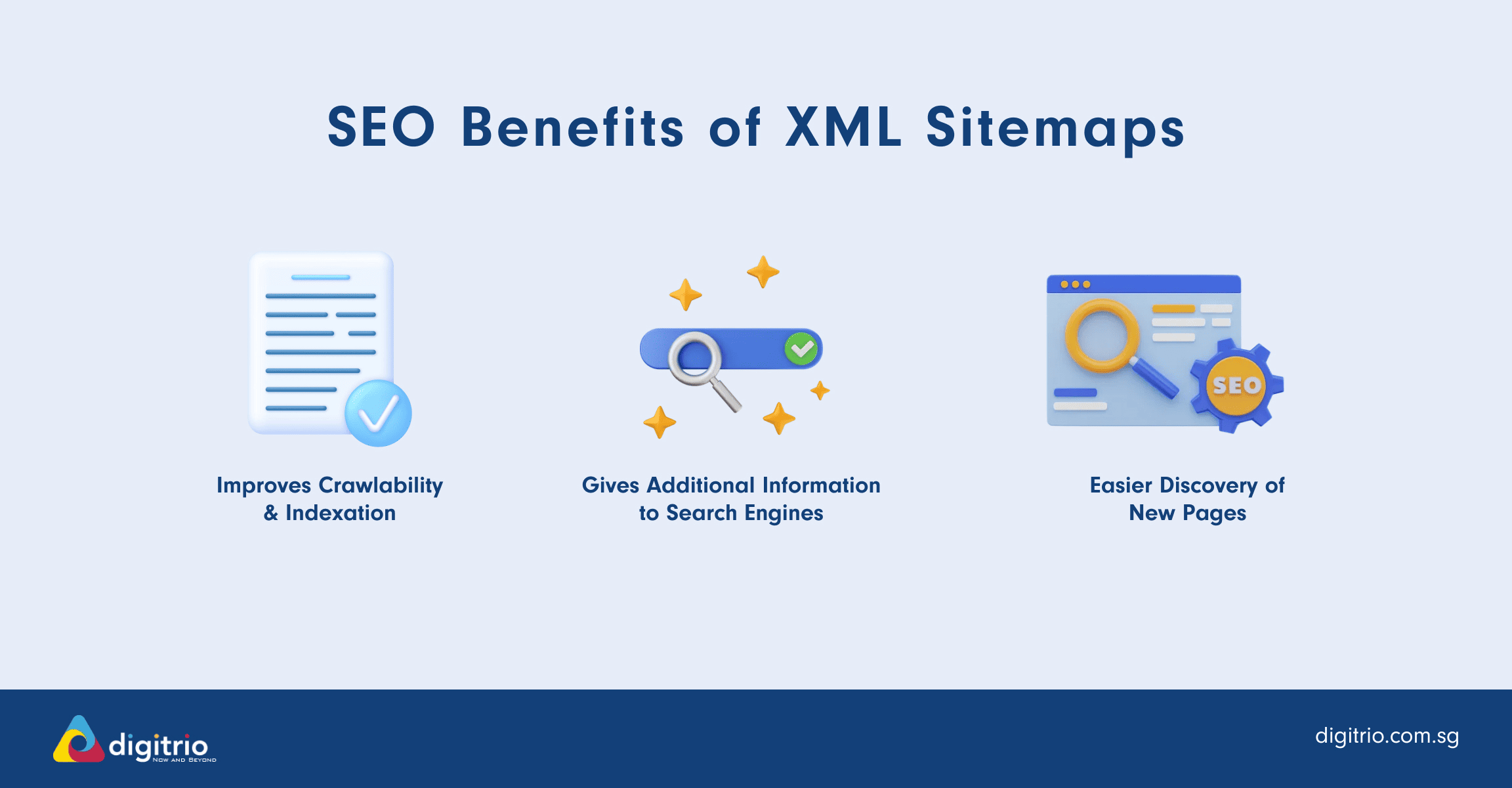
1. Improved Crawlability and Indexation
XML Sitemaps boost both crawlability and indexation of a site, two crucial aspects of SEO.
The clearer the path the XML sitemap provides, the easier it is for these bots to crawl through our pages and understand their relations. By aiding search engines crawl websites more effectively and manage their crawl budgets, XML sitemaps help ensure that search engines can find and index relevant content while avoiding less significant pages. This improved understanding leads to better indexing, which essentially means that our web pages stand a higher chance of showing up in search results.
In simple terms, an XML Sitemap operates like a roadmap for your website, helping search engine bots find all the essential pages on your site. This is especially useful if your site is extensive or contains a large number of archived content that could be overlooked by search engines.
2. Additional Information for Search Engines
XML sitemaps provide additional information to search engines about your website content. This includes important details such as the last modified date, priority level, and frequency of updates for each page.
Search engines use this information to determine how often to crawl your site and whether the content is up-to-date.
3. Easier Discovery of New Pages
Creating an XML sitemap for your website can lead to easier discovery of new pages.
When you add a new page or make changes to existing ones, submitting your updated XML sitemap ensures that search engines will be aware of any new content on your site and can include them in their index faster.
Who Needs an XML Sitemap?
While XML sitemaps are not strictly necessary, they are highly recommended for websites that want to improve their search engine rankings and visibility. Here are some scenarios where an XML sitemap can be particularly beneficial:
- Large Websites: If your site has a large number of pages or complex navigation, an XML sitemap helps search engines find and index all your content efficiently.
- Rich Media Content: Websites that use rich media content, such as images or videos, can benefit from specialized sitemaps like image sitemaps or video sitemaps to ensure this content is indexed properly.
- New Websites: New or recently launched websites with limited external links can use an XML sitemap to help search engines discover their content more quickly.
- SEO Improvement: Any website looking to enhance its SEO strategy can benefit from an XML sitemap, as it helps search engines understand the site’s structure and prioritize important pages.
How to Create an XML Sitemap
To create an XML sitemap, you can either use a sitemap generator tool or manually create the XML file yourself.
1. Using a Sitemap Generator Tool
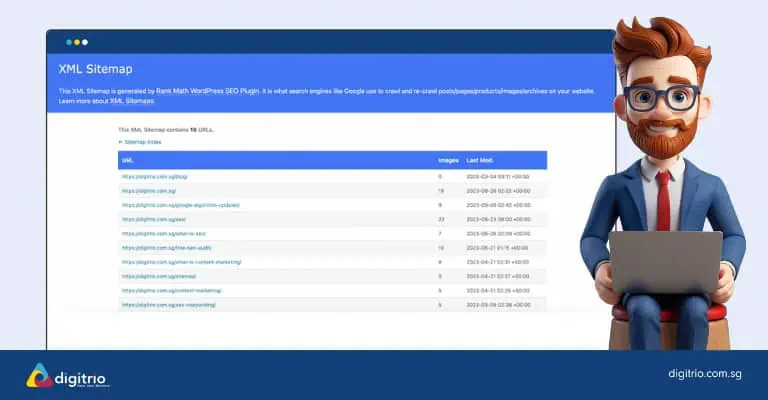
To simplify the process of creating an XML sitemap, you can use a sitemap generator tool. These tools usually allow you to input your website's URL and automatically generate the XML sitemap for you.
Here are some free tools we recommend:
Here are some free tools we recommend:
- 1XML-Sitemaps.com: This website is a great example of a free online sitemap generator
- 2If you’re using WordPress, we recommend the Rank Math plug-in, which is what we used to create our XML sitemap. Alternatively, the Yoast SEO plugin can also be enabled on your WordPress.
These methods helped us save time and eliminate the need for manual coding or complex technical knowledge.
2. Manual Creation of an XML Sitemap
To manually create an XML sitemap, you will need to have a basic understanding of HTML and XML coding.
- 1Start by opening a text editor or an XML editor and create a new file.
- 2Begin by adding the necessary XML declaration at the beginning of the file.
- 3Then, structure your sitemap by creating opening and closing tags for each URL you want to include.
- 4Within each URL tag, provide additional information such as the last modified date and priority level.
- 5
Next, save your file with a .xml extension and make sure it is named "sitemap.xml" for search engines to easily find it.
- 6
Once saved, upload your sitemap to the root directory of your website using FTP or any other method provided by your web hosting provider
Pro Tip: You can provide all the URLs from your website and ask ChatGPT to generate the code for your sitemap.xml.
Submitting and Updating XML Sitemaps
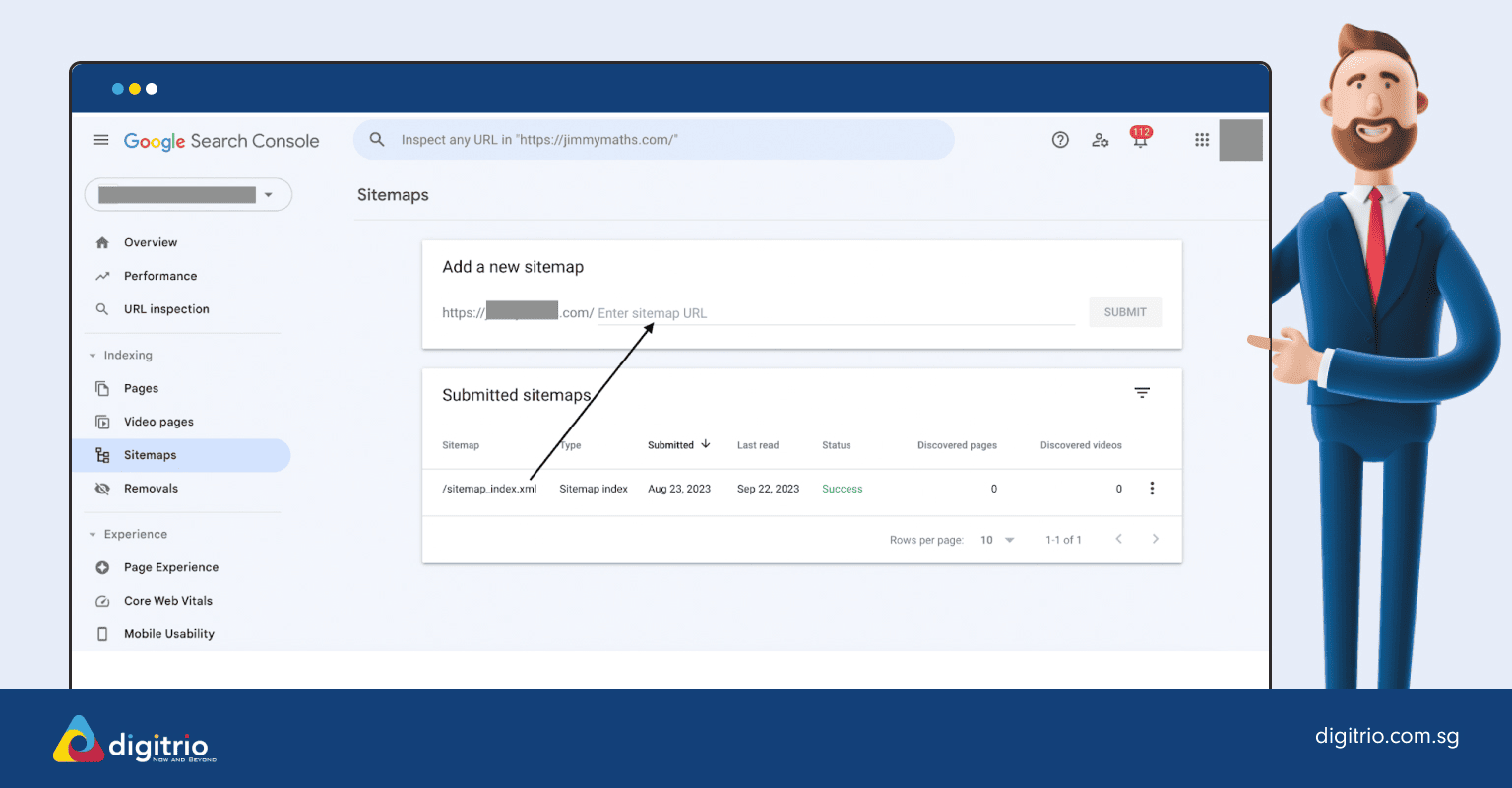
Submit Your Sitemap Using Google Search Console
Here’s a detailed step-by-step on how to submit your sitemap to Google Search Console:
Locate Your Sitemap: Determine the location of your sitemap on your website. This is often found at "www.example.com/sitemap.xml", but can vary.
You can use search queries like “site:example.com filetype:xml” or “site:example.com inurl:sitemap” on Google to find it.
Also, check your robots.txt file to see if the sitemap is linked there.
Access Google Search Console: Log in to your Google Search Console account.
Select the Right Property: Ensure you're working with the correct domain property (remember, http:// and https://, and with or without 'www' are considered different).
Navigate to Sitemaps: Under the “Index” category on the left-hand navigation pane, click on “Sitemaps”.
Remove Old Sitemaps (if necessary): If there are outdated sitemaps, click on the three stacked dots in the top right corner of that sitemap and select the removal option.
Add New Sitemap: Under the “Add a new sitemap” section, enter the end part of your sitemap URLs (excluding the domain portion) and click "Submit".
Verification: Google will then verify the sitemap. It might take some time for Google to crawl the sitemap and index it.
Monitoring: Once submitted, you can view the sitemap's status in the same section. You'll see details like when it was last read by Googlebot and how many URLs were discovered.
Depending on your target market, it may be beneficial to consider submitting your sitemap to Bing through their Bing Webmaster Tools. Visit Statcounter.com to view the search engine market shares within your target market
Best Practices for Keeping Your Sitemap Up-to-Date
To ensure that your XML sitemap is up-to-date and working effectively, there are 3 few best practices you should follow:
Identify and fix sitemap errors using Google's Sitemap Report
Regularly review your website's content and structure to identify any changes or updates that need to be reflected in the sitemap.
Update your sitemap whenever you add new pages or make significant changes to existing ones.
Submit your updated sitemap to search engines using Google Search Console for quicker indexing and improved visibility in search results.
Managing Multiple XML Sitemaps
For websites with extensive content, managing multiple XML sitemaps is essential to ensure that search engines can crawl and index all pages correctly. Here are some tips for effectively managing multiple XML sitemaps:
- Use a Sitemap Index File: A sitemap index file acts as a centralized hub for all your different XML sitemaps. This file lists all individual sitemaps, making it easier for search engines to find and crawl them.
- Consistent Naming Convention: Use a consistent naming convention for your sitemaps to keep them organized and easily identifiable.
- Regular Updates: Keep your sitemaps up-to-date by regularly reviewing your website’s content and structure. Update your sitemaps whenever you add new pages or make significant changes to existing ones.
- Monitor with Tools: Use tools like Google Search Console and Bing Webmaster Tools to monitor your sitemaps for errors and issues. These tools can help you identify and fix problems, ensuring that your sitemaps are always functioning correctly.
By following these best practices, you can ensure that your XML sitemaps are effective in helping search engines crawl and index your website, ultimately improving your site’s visibility and search engine rankings.
Manage Sitemaps With Sitemap Index Files
Pro Tip: There are limits to sitemap file sizes. Larger sites may require multiple sitemaps or an index sitemap.
To effectively manage multiple sitemaps, you can use sitemap index files. These files act as a centralised hub for all your different XML sitemaps, and they help to organise and categorise different sections or types of pages within your site.
To manage your sitemaps with an index file, simply create an XML file called "sitemap-index.xml" and include the URLs of all individual XML sitemaps in it. Here’s an example provided by Google.
Then, submit this single index file in Google Search Console, using the same step-by-step process from an earlier section (starting from step 2).
Congrats! Now You Know More About XML Sitemaps
You’re getting better at SEO services! Learning how to implement technical SEO elements like an XML sitemap to your website is never easy, but now you’re one step closer to a more optimized website.
If you ever need more specialized advice regarding SEO services or website design, professional help is just a call/email away. Our team at Digitrio is here to give you a listening ear if you’re not sure how to begin or advance your journey in SEO services. Reach out to us today and let us know how we can assist your company in enhancing your marketing strategy!
Frequently Asked Questions
XML sitemaps for SEO help search engines understand the structure of your website while they’re crawling it.
Your site's SEO benefits from an XML sitemap as it allows search engines to find and index new valid pages on your site faster, improving its visibility.
While not compulsory, having an XML Sitemap improves your site's chances of being discovered by search engine bots, especially if your website is large or contains many pages.
Yes! There are various online resources available that can help you generate your own customized XML Sitemaps. Try a free online sitemap generator like XML-Sitemaps.com or if you’re using WordPress, you can add the Rank Math plug-in to generate a sitemap.
No, you should not add external links to your XML sitemap. An XML sitemap is intended to map out the pages on your own website that you want search engines to crawl and index. It serves as a guide to your site's content and structure, helping search engines discover important pages more efficiently.


