


Did you know that internal linking could be the game-changer your SEO strategy needs?
- 40% Boost Potential: Authority Hacker’s study of over 1M+ websites found that proper internal linking can boost rankings by up to 40%.
- Better User Experience: Guide visitors seamlessly through your site, increasing engagement and time on page.
- Stronger Crawling & Indexing: Help Google understand and rank your content more effectively.
Despite its proven impact, internal linking is often overlooked. That’s why we’re here to break down exactly how to build a powerful internal linking structure that works for both search engines and users.
Whether you’re new to SEO or want to refine your strategy, this guide will arm you with actionable tips to start improving your rankings today.
Let’s get started!
Key Takeaways
- Internal linking refers to connecting different pages within a website (same domain) using clickable hyperlinks.
- There are three types of internal links: header, footer, and in-text.
- Internal linking for SEO is important because it helps Google bots crawl websites efficiently, passes on link juice to improve page rankings, and signals the importance of specific web pages.
What is Internal Linking?

Definition of Internal Links
Internal links are simply hyperlinks that connect different pages within the same website. Think of them as a map guiding you from one place to another within the same city. They play a big part in SEO in terms of how users and search engines find content on your site.
To be clear, these are not links that send you off to different websites. Those are called external links. No, internal links keep you right where you are—just on a different page or post!
Learn more about the difference between internal and external links, as well as backlinks
Difference between Internal vs External vs Backlinks

Simply put, internal links are links that connect pages within the same website, whereas external links are links that connect to pages on a different website. Meanwhile, backlinks are links from another site that link to your website.
Link Type | Definition | Usage |
|---|---|---|
Internal Links | These are links on your website that lead to other pages within the same website. | Internal links help in website navigation, improve user experience, and can effectively spread "link juice" around your site. They also provide a clear path for Google bots to crawl, understand, and index your site's content. |
External Links | These are links on your site that lead to other websites. They are also known as outbound links. | External links pointing to other sites add value to your content by providing authoritative, useful information to your audience. They can also help build relationships with other sites. |
Backlinks | These are links from other websites that lead to your website. They are also known as inbound links. | Backlinks help enhance your site's SEO by signalling to search engines that your content is valuable and credible. It's like a vote of confidence from other sites. |
What is An Example of an Internal Link?
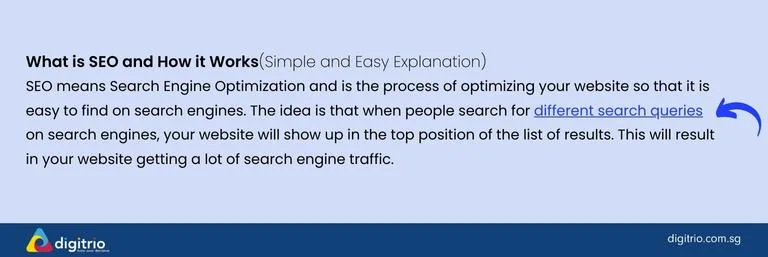
Let’s say you're writing about different types of marketing in one blog post, and you talk about "content marketing". Here’s an example of how you can add an internal link:
“Content marketing is all about producing content that lets consumers make their own choices.”
Over here, we’re adding an internal link to another article on “Content Marketing for Beginners”. It’s not forceful, but rather a natural link for readers who might want to know more about content marketing.
The 3 Types of Internal Links You Need to Know
Here's something interesting:
There isn't just one type of internal link. In fact, there are three main types that each serve a different purpose:
Header Links

Header links are links that appear at the top of your site. They help users find important content quickly. But they do more than just guide people around your website.
They:
- Help search engine crawlers understand your site architecture
- Signal page priority to Google
Footer Links

Footer links are a great tool for your website. These links live at the bottom of your page, much like signs on a road.
Located at the bottom of each page, they:In-text/Contextual Links
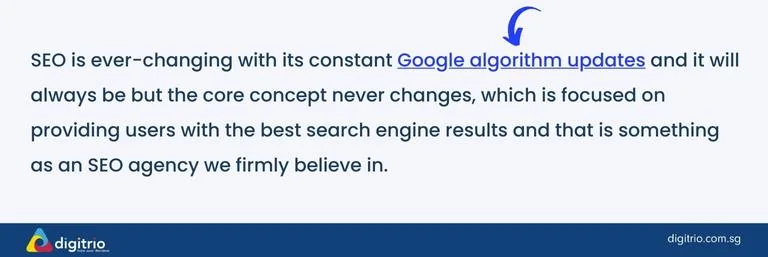
In-text links are a key part of your website. They guide your readers to more useful content on other pages. These links sit right in the middle of your web page's text. They show relevant, deeper info about the topics we talk about.
These in-text links are the real SEO powerhouses because:
- They provide relevant connections between content
- Pass stronger link value
- Help Google understand content relationships
Why Internal Linking Is Critical for SEO Success
Simply put, internal links tell search engines which pages are most important.
Not only do they help users easily find more information on topics they're interested in, but they also help search engines understand the relationships between pages on your website. It's like creating a web of connections within your own site!
Internal linking is a white hat SEO tactic that's highly encouraged across all SEO efforts.
Here's why it matters:
- Better Site Crawling: Search engine spiders use these links to discover and index your pages
- Link Juice Distribution: Internal links help pass authority from strong pages to new pages
- Improved User Experience: They guide visitors to relevant content and reduce bounce rates
- Clear Site Hierarchy: Helps Google understand which pages are most important
- Fixed Orphan Pages: Prevents important content from being isolated
Google Bots Crawl Websites by Following Internal Links
Google bots are like little robots that explore websites on the internet. They do this by following links from one page to another. So when it comes to your website, internal links are really important.
These are the links that connect different pages within your site. When Google bots crawl your website, they use these internal links to discover and understand the content on your site.
This helps them know what each page is about and how it's related to other pages on your site. So make sure you have lots of internal links on your website so Google can easily crawl and index all of your pages!
Passes on “Link Juice”
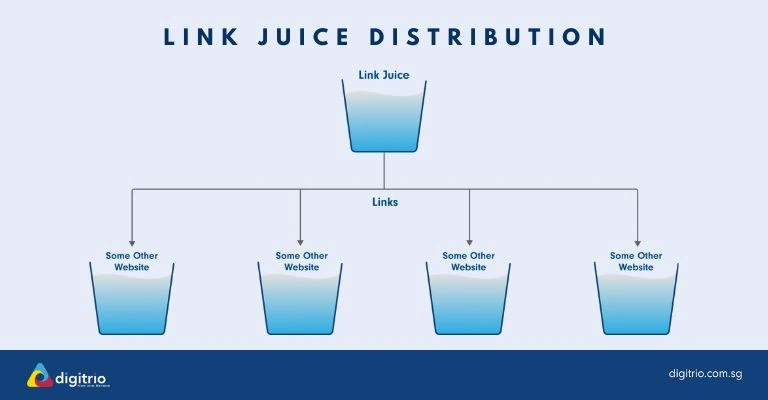
Internal links play a vital role in SEO because they pass on what we call "link juice" from one page to another on the same website. This link juice refers to the authority that a page carries, which can help improve the ranking and visibility of other linked pages in search results.
The more internal links a page has, the more link juice it can potentially pass on to other important or popular pages. So, by strategically placing internal links, you can distribute this link juice and boost the overall SEO impact of your website.
Signals to Google the Main Web Pages
Internal linking on your website serves as a signal to Google about the importance of certain pages. When you include internal links within your content, it tells Google that these pages are valuable and should be ranked higher in search results.
By strategically placing internal links to your core SEO pages and articles, you can guide Google's attention towards them. This helps improve their visibility and increases the chances of them showing up higher in search rankings.
So, make sure to incorporate internal linking into your SEO strategy to send strong signals to Google about the importance of your main web pages.
How to Implement Internal Links On Your Website (Step-by-Step)

To implement internal links on your website, here’s our easy 4-step process:
Step 1: Identify 3-4 Key SEO Pages Important to Your Business
To maximise your SEO impact, it's important to identify pages on your website that are crucial for your business. These pages should be the ones that you want to rank high in search engine results.
For example, since we specialise in digital marketing at Digitrio, some of our important SEO pages would be the following:
Step 2: Add Internal Links From Other Pages / Articles
After identifying those 3-4 SEO pages, the next step is to find other pages/blog articles that can link to those key pages.
For example, at Digitrio, we’ve written multiple blogs that talk about SEO (e.g. What is SEO and How It Works, How Do Search Engines Work, Meta Tags for SEO).
Those blog articles are perfect for internal linking to our key SEO Services page, as the content is relevant.
Step 3: Use Keyword-Rich & Descriptive Anchor Text
Anchor text refers to the words/phrases used as the link. Search engines do look at anchor texts when determining the relevance of a page.
We recommend you use keywords related to the content of the page you're linking to. So instead of using generic phrases like "click here" or "learn more," try to use descriptive terms that accurately represent the content being linked.
For example, we often use “SEO Services” as the internal link anchor text as it very accurately describes our page content.
Step 4: Create a Content Marketing Strategy to Build Internal Links
What if you don't have much relevant content? Don't worry! You can create a content marketing strategy to build internal links.
Basically, this means creating blog content but with a strategy in mind rather than just writing blog articles for the sake of it. For example, to promote internal links pointing to our SEO Services page, we have written a series of SEO-related blog articles.
With this, you can build an organised internal link structure where all your pages and articles are interconnected!
Pro Tip: Want to do an internal link audit? Go to Google Search Console and look under the Links report feature to see what your existing site’s internal links are like!
If you’re unsure where to begin with your content marketing strategy, feel free to reach out to us for a free consultation.
Best Practices for Internal Linking
Follow these guidelines to maximize your internal linking success:
- Keep it relevant
- Only link to related content
- Ensure the link adds value
- Maintain contextual relevance
- Use descriptive anchor text
- Include target keywords naturally
- Vary your anchor text
- Make it clear what the linked page is about
- Maintain a reasonable number of links
- Don't overflow pages with internal links
- Aim for 2-5 relevant internal links per 1,000 words
- Focus on quality over quantity
- Regular maintenance
- Conduct internal link audits
- Fix broken internal links
- Update old content with new internal links
Get Your Professional Internal Linking Strategy
Remember: A successful internal linking strategy isn't about cramming as many links as possible into your content.
It's about creating a logical, user-friendly site structure that both visitors and search engines can easily navigate.
The key is to be strategic, consistent, and always focus on providing value to your users while maintaining a solid internal linking structure.
SEO can be impactful when you do it right. Give us a call or email us today and get professional advice from us.
FAQ on Internal Links
Google considers internal linking to be “super critical for SEO”, as it tells Google which pages on a site are important. This is especially crucial for bigger sites, where there are more pages and an important page can get buried. So internal linking can point Google and site visitors to your key SEO pages.
Even with all that said, Google doesn’t explicitly say that internal linking is a ranking factor. But one thing’s for sure, Google highly encourages strategic internal linking, where you have to consider which pages you care about most, and what other pages/articles can help to highlight those key pages. They even have a whole documentation on link best practices that includes internal links.
When it comes to the number of internal links that are good for SEO, there's no exact magic number. It's more about quality over quantity. You want to make sure your internal linking strategy is deliberate and purposeful.
For a rough guideline, we recommend the following:
- Link only relevant pages together
- Prioritise linking your important or cornerstone content
- For every page/article, add 2-3 internal links to other pages (which should include key SEO pages)
Having too many internal links on your website can actually be bad for SEO. Here are 4 reasons why:
Crawling issues: When there are an excessive number of internal links, search engine crawlers may only crawl some of the page links, ignoring others. This can result in some important pages being left out by Google.
Less link juice: As mentioned in the article, link juice/authority is carried from one page to another. If too many internal links are included, the link juice will be in a sense “diluted” when it is distributed across a larger number of pages.
Spam: Too many links can look like spam to Google. This may signal Google to penalize your site.
Need to fix broken internal links: The more internal links = the more potential for broken links (and link rot). This will put pressure on you to maintain your website more often.


